Introduction to barcode parsing
Barcodes are everywhere.
They’re so omnipresent that we easily take them for granted, and rarely think about their existence and how they really work. Meanwhile, barcodes are extremely important for all kinds of logistics, the foundation of modern society.
This post is an introduction to barcode parsing, and to all the corner cases that make it a bad idea to write your own barcode parser.
Barcodes in Oda
My interest in barcodes was ignited in 2019, when I started working as a software developer in Oda, today the largest online grocery in Norway and Sweden. Oda uses barcodes throughout their processes, all the way from receiving pallets of goods, restocking shelves, and picking products to tracking customer deliveries and bottle return bags.
My work led me to touch code handling barcodes several times. I quickly realized that across systems, and across the server-side Python and the client-side TypeScript, we had multiple implementations. The different implementations focused on different usage scenarios and all of them had their own set of limitations and hacks. The hacks caused errors nobody had the insight to understand the source of, which again caused extra manual work in the fulfillment center and reduced efficiency.
As for any good software engineer, this situation left something to be desired. I wanted a single barcode parser to rule them all. A parser that followed the standards I presumed existed and made the world of logistics tick to the beat of an ever higher UPH.
A Python library for making sense of the data in barcodes
I channeled my desires into building Biip, a new Python library for barcode parsing. During the work on Biip I got to skim through hundreds of pages of GS1 specifications and learned a lot about the world of logistics.
In the end, it was a success. Biip has been in production at Oda since 2020. Over the course of a year, it replaced all existing barcode parsers in Oda, and it is still used today to parse the barcode on all incoming pallets, all packages moved between shelves, all products picked, all customer order cardboard boxes, and all bottle return bags. In total, Biip parses hundreds of thousands of barcodes every day, just in Oda.
Here be dragons
This post is meant as an introduction to barcode parsers in general, with focus on barcode parsing at the point of sale, going into topics like GTIN, EAN and UPC. Barcodes used in logistics, like GLN, SSCC, and GS1-128, are outside the scope of this post.
After reading this you’ll hopefully appreciate that there are more than just a few corner cases to consider and handle correctly when parsing barcodes.
Your takeaway should be to use a library like Biip if you ever need to write code working with barcodes.
The learnings are not specific to Python or Biip, but to make things a bit more concrete and serve as a resource for Biip users as well, I’ll make use of Biip in my code examples.
Disclaimer: We just care about the data
Biip’s documentation starts with
Biip is a Python library for making sense of the data in barcodes.
This means that we work with the strings of data read from a barcode. If you have a photo of a barcode, Biip cannot help you.
To get from a physical barcode to the digits and characters that barcode contains, you must use something else, like a hardware barcode scanner, a phone app, or the Barcode Detection API available in Chrome on Android, ChromeOS, and macOS.
Once you’ve got hold of the digits and characters the barcode has hidden inside it, Biip is ready to help you make sense of it all.
Barcode symbologies at the point of sale
Wait, what!? Does Biip just parse and validate barcodes? It’s just 13 digits with a simple check digit!
When talking about barcodes, you’re probably thinking of the EAN and UPC barcode symbologies, which are used on all items being scanned at the cash register, or at a “point of sale” or “POS” as it is often called.
Basically, on everything you can buy.
Barcodes like these…
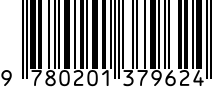
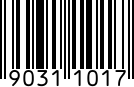
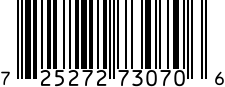
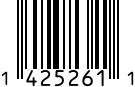
If so, the answer is yes, Biip can parse and validate EAN and UPC. But, that is not all there is to it. As always, the devil is in the details.
The numbers in the above EAN-13, EAN-8, and UPC-A barcodes are called Global Trade Item Numbers, or GTINs for short.
To be entirely exact: the EAN-13 contains a GTIN-13, the EAN-8 contains a GTIN-8, and the UPC-A contains a GTIN-12.
UPC-E is something else, which we’ll see in a bit.
Using different terms for the barcode symbology and the data encoded within the barcode is useful as it helps us be exact and specific when we talk about this. GTINs are not used just in barcodes, but also in places such as purchase orders, exactly identifying the product variant you’re ordering.
EAN-8, EAN-13, and GTINs
Let’s have a look at how Biip works: Here’s the GTIN-13 number from the EAN-13 barcode parsed and validated using Biip’s Gtin class. To make the output easier to read, the examples use print() from Rich. With Rich, Biip hides the fields that have their default value.
>>> from rich import print
>>> from biip.gtin import Gtin
>>> gtin_13 = Gtin.parse("9780201379624")
>>> print(gtin_13)
Gtin(
    value='9780201379624',
    format=GtinFormat.GTIN_13,
    prefix=GS1Prefix(value='978', usage='Bookland (ISBN)'),
    company_prefix=None,
    item_reference=None,
    payload='978020137962',
    check_digit=4
)
Biip recognizes the input as being of the GTIN-13 format.
It splits the payload from the check digit, and validates that the payload and check digit match. To ensure that the barcode has been read correctly and to reject any invalid data, a ParseError is raised if the check digit doesn’t match.
Looking at the prefix attribute, Biip extracted 978, which is the GS1 Prefix this GTIN belongs to.
The GS1 Prefix usually signifies a national GS1 organization, like “GS1 Poland” or “GS1 US”. In this case the prefix shows that the GTIN is from “Bookland”, which is the imaginary country where all books and their ISBN identifiers come from.
Apparently, even the people making standards for the numbering of things have fun sometimes.
We can do the same with the GTIN-8 read from the EAN-8 barcode.
>>> gtin_8 = Gtin.parse("90311017")
>>> print(gtin_8)
Gtin(
    value='90311017',
    format=GtinFormat.GTIN_8,
    prefix=GS18Prefix(value='903', usage='GS1 Austria'),
    company_prefix=None,
    item_reference='1101',
    payload='9031101',
    check_digit=7
)
It is recognized as a GTIN-8 instead of GTIN-13. GTIN-8 has its own list of GS1-8 Prefixes, so the prefix is a GS18Prefix, showing that the number was issued by “GS1 Austria”.
UPC-A and UPC-E
For the UPC-A and UPC-E barcodes, we can use Biip’s Upc class to parse the data.
>>> from biip.upc import UpcFirst, the longer UPC-A:
>>> upc_a = Upc.parse("725272730706")
>>> print(upc_a)
Upc(
    value='725272730706',
    format=UpcFormat.UPC_A,
    number_system_digit=7,
    payload='72527273070',
    check_digit=6
)
As the numbers used in UPC-A barcodes are a part of the GTIN standard, called GTIN-12, it can also be parsed with the Gtin class.
>>> gtin_12 = Gtin.parse("725272730706")
>>> print(gtin_12)
Gtin(
    value='725272730706',
    format=GtinFormat.GTIN_12,
    prefix=GS1Prefix(value='072', usage='GS1 US'),
    company_prefix=GS1CompanyPrefix(value='0725272'),
    item_reference='73070',
    payload='72527273070',
    check_digit=6
)
We can also parse the shorter UPC-E variant:
>>> upc_e = Upc.parse("14252611")
>>> print(upc_e)
Upc(
    value='14252611',
    format=UpcFormat.UPC_E,
    number_system_digit=1,
    payload='1425261',
    check_digit=1
)
A subset of UPC-A numbers can be compressed to UPC-E for use on physically smaller products, like bubble gum. As such, there is no GTIN variant that is equivalent to UPC-E.
Expanding UPC-E into UPC-A
The primary reason for Biip to have a dedicated Upc class as well as the more generic Gtin class is to be able to handle the expansion from the compressed UPC-E variant to the full-length UPC-A variant.
The conversion between UPC-A and UPC-E is somewhat complex, and follows different rules depending on what numbers are found in the different digit places.
Luckily, you don’t need to learn the details as hardware barcode scanners usually expand from UPC-E to UPC-A automatically before passing the data on to your application.
If you find yourself handling unexpanded UPC-E yourself, Biip has you covered.
>>> upc_e.value
'14252611'
>>> upc_e.as_upc_a()
'142100005261'
Of course, Biip can also compress UPC-A back to UPC-E.
>>> Upc.parse("142100005261").as_upc_e()
'14252611'
However, compression from UPC-A to UPC-E is only possible for the subset of UPC-A that can be represented in the shorter UPC-E format.
>>> upc_a.as_upc_e()
...
EncodeError: UPC-A '725272730706' cannot be represented as UPC-E.
The conversion between UPC-A and UPC-E is an example of something that isn’t entirely straightforward, but that a library like Biip handles for you when you need it.
That concludes the introduction to the four essential barcode types at the point of sale, EAN-13, EAN-8, UPC-A, and UPC-E, and how they all relate to GTIN numbers.
Implementing a cash register
Unless you have a special use case where you know for certain that you will handle only GTINs or only UPCs, the Gtin.parse() and Upc.parse() methods are not the usual entry point into Biip.
Let’s imagine that we’re implementing a cash register. To do so, we must be able to:
- scan any product barcode, EAN or UPC, without knowing which is which, and
- have it match the product in the cash register’s database to look up the correct price.
We’ll start with the first problem.
Parse unknown input
Biip’s main entry point is the biip.parse() function. The function takes any string of data as input and returns a ParseResult data structure with all the possible interpretations it has of the input.
>>> import biip
>>> print(biip.parse("9780201379624"))
ParseResult(
    value='9780201379624',
    gtin=Gtin(
        value='9780201379624',
        format=GtinFormat.GTIN_13,
        prefix=GS1Prefix(value='978', usage='Bookland (ISBN)'),
        company_prefix=None,
        item_reference=None,
        payload='978020137962',
        check_digit=4
    ),
    upc_error="Failed to parse '9780201379624' as UPC: Expected 6, 7, 8, or 12 digits, got 13.",
    sscc_error="Failed to parse '9780201379624' as SSCC: Expected 18 digits, got 13.",
    gs1_message=GS1Message(
        value='9780201379624',
        element_strings=[
            GS1ElementString(
                ai=GS1ApplicationIdentifier(
                    ai='97',
                    description='Company internal information',
                    data_title='INTERNAL',
                    separator_required=True,
                    format='N2+X..90'
                ),
                value='80201379624',
                pattern_groups=['80201379624']
            )
        ]
    )
)
In this case, the data can be interpreted either as a Gtin or a GS1Message. The GS1Message interpretation is a coincidence: the data starts with 97, which is the GS1 Application Identifier for “Company internal information”, and the rest of the data fits the format of that field. A barcode containing only an ISBN is of course not meant to be read like this, which is why biip.parse() returns all possible interpretations and leaves it to you to pick the one that fits your use case. We’ll look at a way to help Biip pick in a bit.
GS1 messages are mostly used in logistics, before the goods end up at the point of sale, so they are outside the scope of this post.
The Gtin part is exactly the same as you’ve seen before.
Let’s try the UPC-A barcode again.
>>> print(biip.parse("725272730706"))
ParseResult(
    value='725272730706',
    gtin=Gtin(
        value='725272730706',
        format=GtinFormat.GTIN_12,
        prefix=GS1Prefix(value='072', usage='GS1 US'),
        company_prefix=GS1CompanyPrefix(value='0725272'),
        item_reference='73070',
        payload='72527273070',
        check_digit=6
    ),
    upc=Upc(
        value='725272730706',
        format=UpcFormat.UPC_A,
        number_system_digit=7,
        payload='72527273070',
        check_digit=6
    ),
    sscc_error="Failed to parse '725272730706' as SSCC: Expected 18 digits, got 12.",
    gs1_message_error="Failed to get GS1 Application Identifier from '2730706'."
)
The top-level parse() function recognized the UPC-A both as a GTIN-12 and as a UPC-A, which is entirely correct as any UPC-A number is also a valid GTIN-12.
If we parse the UPC-E barcode again, we see that it is recognized as a UPC-E barcode, but also automatically expanded to a UPC-A and presented in its GTIN-12 format.
>>> print(biip.parse("14252611"))
ParseResult(
    value='14252611',
    gtin=Gtin(
        value='142100005261',
        format=GtinFormat.GTIN_12,
        prefix=GS1Prefix(value='014', usage='GS1 US'),
        company_prefix=GS1CompanyPrefix(value='0142100'),
        item_reference='00526',
        payload='14210000526',
        check_digit=1
    ),
    upc=Upc(
        value='14252611',
        format=UpcFormat.UPC_E,
        number_system_digit=1,
        payload='1425261',
        check_digit=1
    ),
    sscc_error="Failed to parse '14252611' as SSCC: Expected 18 digits, got 8.",
    gs1_message_error="Failed to get GS1 Application Identifier from '14252611'."
)
Symbology identifiers
Getting several interpretations of the same data isn’t always what you want. Wouldn’t it be nice if the barcode scanner could tell us what kind of barcode it just read?
Many hardware barcode scanners can do exactly that. Look in your scanner’s manual for how to enable “symbology identifiers”, sometimes called “AIM identifiers”. When they are enabled, the scanner prefixes everything it sends to your software with a three-character code, like ]E0 for EAN-13 and UPC-A, or ]E4 for EAN-8.
Biip detects the symbology identifier and only tries the parsers that are relevant for that symbology. Let’s parse the ISBN from before again, this time with the ]E0 prefix the scanner added:
>>> print(biip.parse("]E09780201379624"))
ParseResult(
    value=']E09780201379624',
    symbology_identifier=SymbologyIdentifier(
        value=']E0',
        iso_symbology=ISOSymbology.EAN_UPC,
        modifiers='0',
        gs1_symbology=GS1Symbology.EAN_13
    ),
    gtin=Gtin(
        value='9780201379624',
        format=GtinFormat.GTIN_13,
        prefix=GS1Prefix(value='978', usage='Bookland (ISBN)'),
        company_prefix=None,
        item_reference=None,
        payload='978020137962',
        check_digit=4
    )
)
The symbology_identifier field tells us that the data came from an EAN-13 barcode. Because of this, Biip only tried the GTIN parser. The GS1Message interpretation from before is gone, and so are all the error messages from the other parsers.
This looks very promising. Let’s move on to problem two: have it match the product in the cash register’s database, so that we can get hold of the item’s price.
Database lookup with different GTIN formats
On our imaginary cash register, we scan a product with an EAN-8 barcode.
>>> biip.parse("90311017").gtin.value
'90311017'
Perfect, Biip is happy, so the EAN-8 barcode contains a valid GTIN.
Then we move on to looking up the product in the cash register’s database so that we can find the price we should charge.
SELECT price FROM products WHERE gtin = '90311017';Hmm, there’s no match. How can that be?
After debugging for a bit, you realize that the price is in the database, but the product’s GTIN is 0000090311017, which is quite a bit longer than the one you scanned.
It seems like our imaginary supplier used GTIN-13 to identify the product in their price catalog, and you imported it as-is into your product database.
You quickly work around this by changing your query to do a suffix match:
SELECT price FROM products WHERE gtin LIKE '%90311017';Is this the right solution, you ponder for a second. You shrug it off and get on with your next task.
Variable measure barcodes
You scan a package with approximately 1 kg of Norvegia, a tasty Norwegian cheese, which has what seems like an entirely regular EAN-13 barcode.
>>> biip.parse("2302148210869").gtin.value
'2302148210869'
As it is a valid GTIN, you get on to the database lookup.
SELECT price FROM products WHERE gtin LIKE '%2302148210869';Again, no matches.
Looking in the database, you find the product. This time, the GTIN from the product catalog is 2302148200006.
It has the same length as the GTIN you scanned, but several digits have been replaced by zero and the check digit has changed too.
You wonder quickly if you have data corruption in your database, before you realize that you can use Biip to verify that the GTIN from the database is valid.
Since the GTIN has a check digit, we can check if it is valid. If it is, a random corruption would only have a one in ten chance of going unnoticed. That’s all a single check digit can give you.
>>> rcn = biip.parse("2302148200006").gtin
>>> print(rcn)
Rcn(
    value='2302148200006',
    format=GtinFormat.GTIN_13,
    prefix=GS1Prefix(
        value='230',
        usage='Used to issue GS1 Restricted Circulation Numbers within a geographic region (MO defined)'
    ),
    company_prefix=None,
    item_reference=None,
    payload='230214820000',
    check_digit=6,
    usage=RcnUsage.GEOGRAPHICAL
)
Yay, it is most probably valid. Still, something is off with the parse result…
The class of the returned value is no longer Gtin, but something new called Rcn. The Rcn class looks approximately the same as the Gtin class, but it has extra fields, like usage.
What happened here was that Biip detected that this GTIN was in fact not a GTIN, but something called a Restricted Circulation Number, or RCN for short.
There’s actually no Wikipedia article about RCNs, but luckily we have the GS1 General Specifications to lean on!
RCNs have many of the properties of GTINs, but they’re not really GTINs. GTINs are, as the “global” in their name indicates, globally valid, while RCNs are only valid within a single company or a single country, depending on the RCN’s first few digits.
You can see what kind of RCN you have at hand by looking at the usage field, which in this case tells us we have an RCN which is restricted to a geographical region, typically a country. However, in this example, the region is blank.
>>> rcn.usage, rcn.region
(RcnUsage.GEOGRAPHICAL, None)
While GTINs only uniquely identify a product globally, an RCN may encode more information, like product weight, count, or price. This is typically used for products that don’t have a fixed standardized weight, like cheese, fruit, and vegetables.
In the example, the Rcn class has fields for weight, count, price, and money, but again they are all blank. Why is that?
>>> rcn.weight, rcn.count, rcn.price, rcn.money
(None, None, None, None)
Each geographical region has its own rules for how to interpret the contents of an RCN, so there’s no way for Biip to know what’s the right thing to do here.
Assuming you know what country you’re physically operating in, you can tell Biip the geographical region of your imaginary cash register.
We can now extract more information from the cheese’s RCN.
>>> from biip import ParseConfig
>>> from biip.rcn import RcnRegion
>>> config = ParseConfig(rcn_region=RcnRegion.NORWAY)
>>> print(
...     biip.parse("2302148210869", config=config)
...     .gtin
... )
Rcn(
    value='2302148210869',
    format=GtinFormat.GTIN_13,
    prefix=GS1Prefix(
        value='230',
        usage='Used to issue GS1 Restricted Circulation Numbers within a geographic region (MO defined)'
    ),
    company_prefix=None,
    item_reference='021482',
    payload='230214821086',
    check_digit=9,
    usage=RcnUsage.GEOGRAPHICAL,
    region=RcnRegion.NORWAY,
    weight=Decimal('1.086')
)
What happened here is that Biip now applied the Norwegian RCN rules. One of the rules states that RCNs starting with 23 should be interpreted as six digits uniquely identifying the product within Norway’s borders, followed by a weight in kilograms with three decimals, and finally the regular check digit.
Biip already has support for interpreting RCNs from a number of countries, but far from all. If you can find documentation on your local format, it is fairly straightforward to add the rules to Biip.
Patches accepted!
Zeroing out the variable part
Now, how does all of this help you compare the number you scanned from the cheese with the number in your product database?
If Biip knows the rules for the RCN region we’re in, it can zero out the variable part. In this case, this converts 2302148210869 to 2302148200006.
>>> print(
...     biip.parse("2302148210869", config=config)
...     .gtin
...     .without_variable_measure()
... )
Rcn(
    value='2302148200006',
    format=GtinFormat.GTIN_13,
    prefix=GS1Prefix(
        value='230',
        usage='Used to issue GS1 Restricted Circulation Numbers within a geographic region (MO defined)'
    ),
    company_prefix=None,
    item_reference='021482',
    payload='230214820000',
    check_digit=6,
    usage=RcnUsage.GEOGRAPHICAL,
    region=RcnRegion.NORWAY,
    weight=Decimal('0')
)
That was a long detour, but we can now finally look up the price for Norvegia:
SELECT price FROM products WHERE gtin LIKE '%2302148200006';Since we’re dealing with variable measure barcodes here, the price is probably per kilogram of cheese. Luckily, the extra RCN data told us how much this specific piece of cheese weighed, so you can now easily multiply the kilogram price and the weight to get the item price.
The correct interpretation of RCNs is another example of something that isn’t entirely straightforward, but that Biip handles for you if you need it.
Normalization of GTINs
We’re now able to parse any barcode without knowing its type ahead of time, and we’re able to look up most products in our database.
But, we can do better.
By normalizing the GTINs both when importing the product catalog into our database and when scanning products, we can solve several problematic situations:
Like most stores, you have multiple suppliers. Your database includes data on all of their products, imported from different sources.
Some suppliers only use GTIN-13 and GTIN-8 for their products. A few of the items are priced according to weight, so they use RCN instead of GTIN.
Easy peasy, we solved this with variable measure zeroing and suffix matching! Or is there a better way?
An American supplier of yours uses UPC-A on most of their products, but has a couple of tiny items where they use UPC-E to get a physically smaller barcode.
In the product catalog you imported from this supplier, some items were identified with the shorter UPC-E codes, while some were already expanded to UPC-A.
How do we look up these in the database? I guess we need to compress and expand all UPC barcodes we scan to both UPC-A and UPC-E format, and change the database query to look for anything matching either of them?
One of your customers really loves the chocolate Firkløver from Freia. They prefer to buy Firkløver in batches of 17 plates of 200g, conveniently packaged in a cardboard box.
The 17-pack has its own barcode, but it is an ITF-14 barcode encoding a longer GTIN-14 number. This GTIN-14 is different from the GTIN-13 which is on each chocolate plate package.
If there only was a way you could scan the 17-pack once on your cash register, look up the GTIN-14 in your database, and it would tell you that the box contained exactly 17 of another item and what the GTIN of this inner item is…
Imagine, being able to take payment for all 17 plates without counting them or scanning them one by one.
The solution to all of these problems is to normalize all GTINs as GTIN-14, both before storing them in your database and before using them for lookups in your database.
# GTIN-8 as GTIN-14
>>> biip.parse("96385074").gtin.as_gtin_14()
'00000096385074'
# GTIN-12 as GTIN-14
>>> biip.parse("123601057072").gtin.as_gtin_14()
'00123601057072'
# GTIN-13 as GTIN-14
>>> biip.parse("5901234123457").gtin.as_gtin_14()
'05901234123457'
# GTIN-14 as... GTIN-14
>>> biip.parse("98765432109213").gtin.as_gtin_14()
'98765432109213'
# UPC-E as GTIN-14
>>> biip.parse("14252611").gtin.as_gtin_14()
'00142100005261'
# UPC-A as GTIN-14
>>> biip.parse("042100005264").gtin.as_gtin_14()
'00042100005264'
For the 17-pack, normalization lets you store the box’s GTIN-14 in the same database column as the GTINs of all other products. The barcode does not tell you what is inside the box, though, so you still need to store the relationship between the box and the 17 plates in your database.
After normalizing everything to GTIN-14 and removing any variable measure parts, you can simplify a lot and make your database lookups an exact science.
For the cheese, this means that you zero out the weight and then convert the RCN to GTIN-14:
>>> (
...     biip.parse("2302148210869", config=config)
...     .gtin
...     .without_variable_measure()
...     .as_gtin_14()
... )
'02302148200006'
Because an RCN is only unique within its region, you store the RCN region together with the GTIN in your database, and include it in the lookup:
SELECT price FROM products WHERE gtin = '02302148200006' AND rcn_region = 'no';Summary
If you manage to get the essence out of my ramblings here, you should be better prepared for a successful adventure with barcodes.
Just remember to bring a barcode parsing library, like Biip, to handle the corner cases for you!
I started writing this post in 2022 and finished it in 2026. The code examples are up to date with Biip 5.2.